

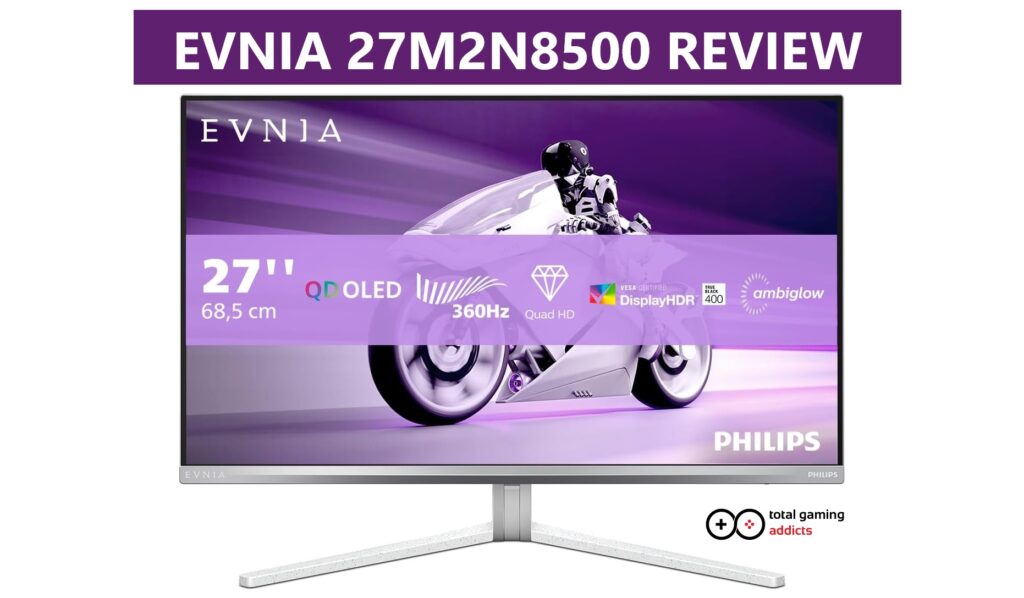
With the Evnia 27M2N8500, Philips has delivered a statement piece.
This 27-inch QD-OLED monitor combines a blistering 360Hz refresh rate with the crisp visuals of a QHD panel, all at a price point that undercuts much of the competition. For gamers seeking the ultimate in speed and response without breaking the bank, the Evnia 27M2N8500 is an incredibly compelling package.
- Manufacturer: Philips EVNIA
- Model: 27M2N8500
- Display Type: 27” QD-OLED Gaming Monitor
- Resolution: QHD 2560*1440p (16:9 1440p)
- Refresh rate: 360 Hz
- Price when reviewed: £439 or less at numerous retailers
- Supplied by: Philips EVNIA
Evnia 27M2N8500 Review
Overview
The Evnia 27M2N8500 is phenomenal for gaming, but is also an outstanding all-around monitor. Presented in what is many competitive gamers’ favourite size/resolution combination, the 27-inch panel with 2560×1440 resolution provides a sharp and detailed image while leaving enough headroom for modern GPUs and CPUs to be able to reach the lofty 360 Hz refresh rate in many popular competitive titles. The 360 Hz refresh rate delivers incredibly fluid motion and is a significant step up from the 240Hz standard often seen in this category; to my surprise, it is an improvement I could visibly see in side-by-side comparisons. This is coupled with a near-instantaneous 0.03ms response time, a characteristic of OLED technology that basically eliminates motion blur.
The 27M2N8500 monitor carries a DisplayHDR True Black 400 certification, creating deep blacks and impactful HDR performance. Whether gaming, browsing or enjoying your favourite movies and TV shows, this monitor excels, with bright, punchy colours and stunning contrast. Combined with an excellent factory calibration that requires no adjustment, this is a fantastic display. Philips has also included its signature Ambiglow lighting and both FreeSync Premium Pro and G-SYNC compatibility.
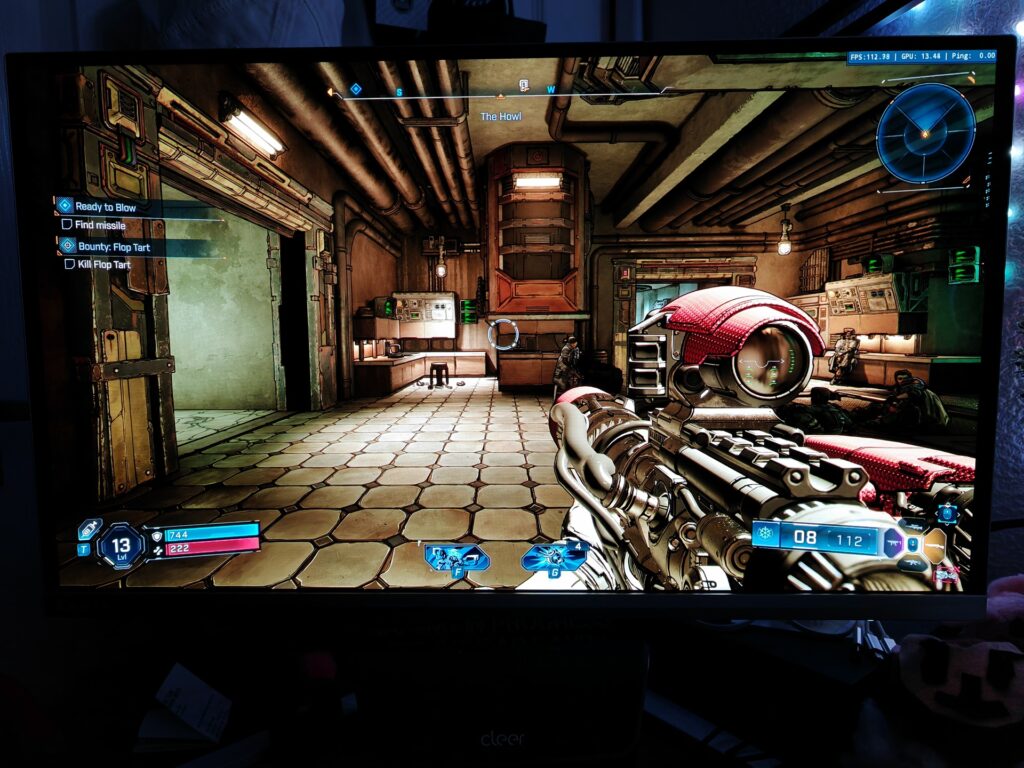
It’s been an absolute dream gaming on this monitor. Whether I was taking in the sights of the latest AAA blockbusters in stunning HDR or basking in the incredible smoothness of 360 fps as I was spinning around, checking corners on CS2, the 27M2N8500 was flawless.
As usual, I don’t look at the cost of monitors before I’ve written the review, so I was blown away when I saw the price of the Evnia 27M2N8500 – I was expecting £700 minimum, as this feels every bit a premium monitor, and I was fully prepared to recommend it even at that price; To find out you can get this much monitor for £439 (or less, depending on sales) was mind-boggling.
Design & Build
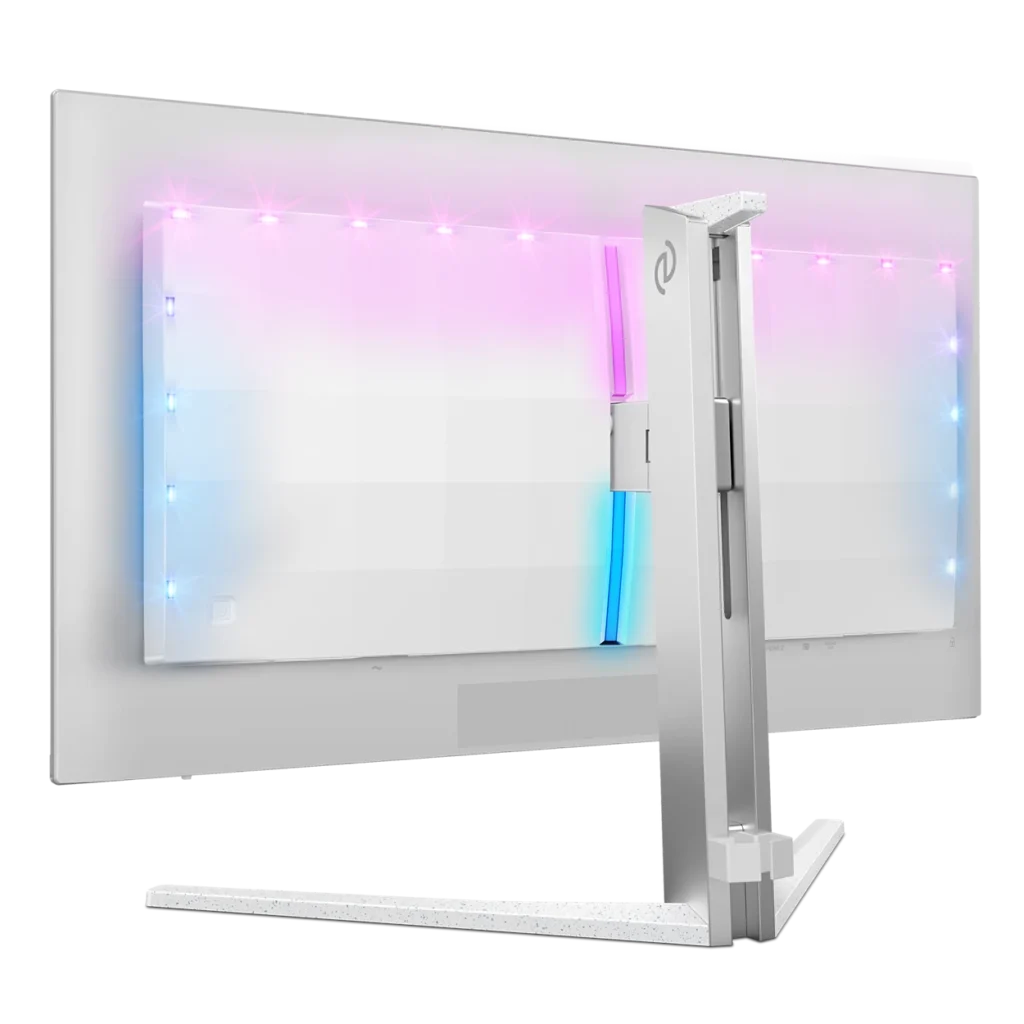
Departing from the aggressive black and red aesthetics common in gaming hardware, the Evnia 27M2N8500 opts for a refreshing all-white and silver finish. This gives it a clean, modern look that can fit into a wider variety of setups. This looks especially appealing alongside my white PC case and desktop speakers.
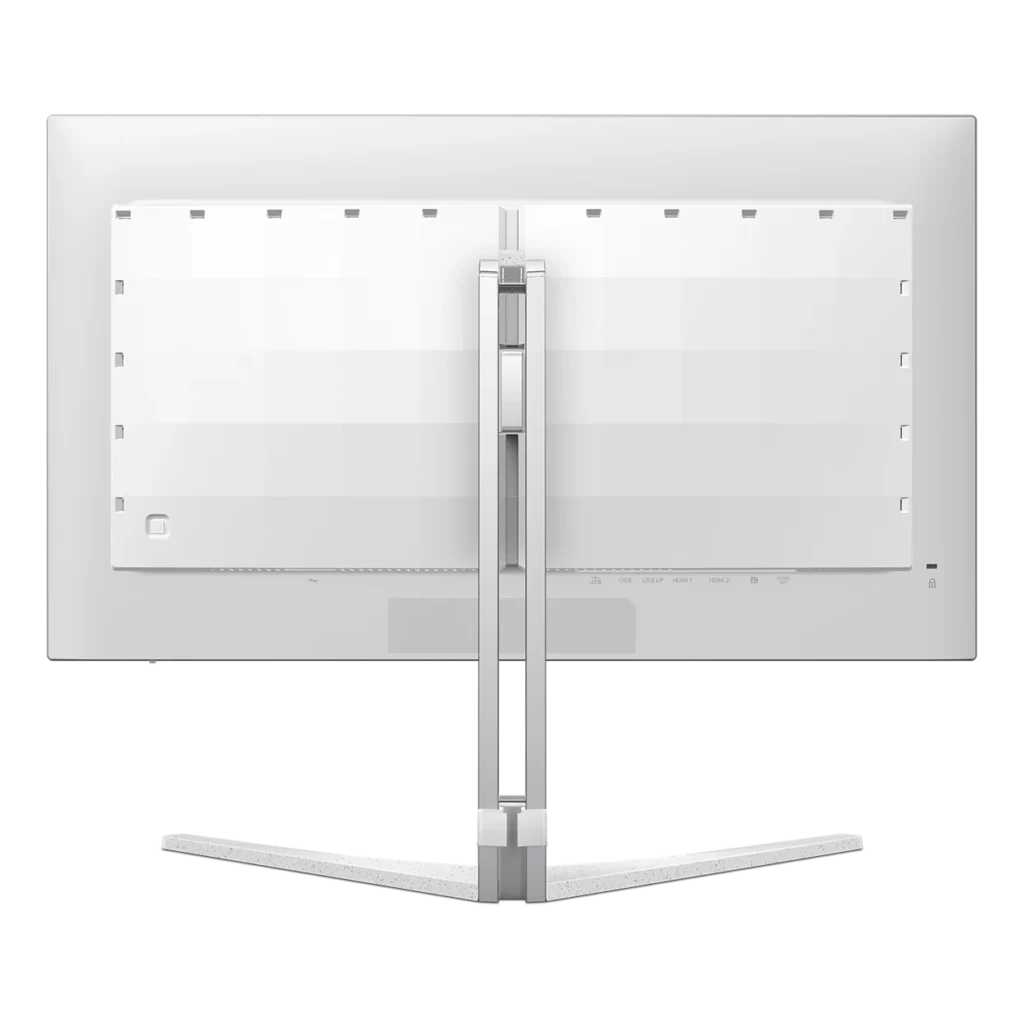
The stand is robust, featuring an all-metal upright and a solid base that holds the display steady, even during vigorous gaming sessions. Ergonomically, the monitor offers a good range of adjustment, including 130mm of height, a -5/20 degree tilt, and a 30-degree swivel, though it does not support rotation into a portrait orientation. The bezels are suitably slim on three sides with a slightly thicker chin bezel and subtle EVNIA logo, and the overall build quality feels premium and solid. A unique and welcome feature is the 3-sided Ambiglow, which casts colored light onto the wall behind the monitor, enhancing immersion. You can choose between static or preprogrammed lighting effects, or my favourite, the Follow Video mode, which creates reactive lighting based on the action on screen.
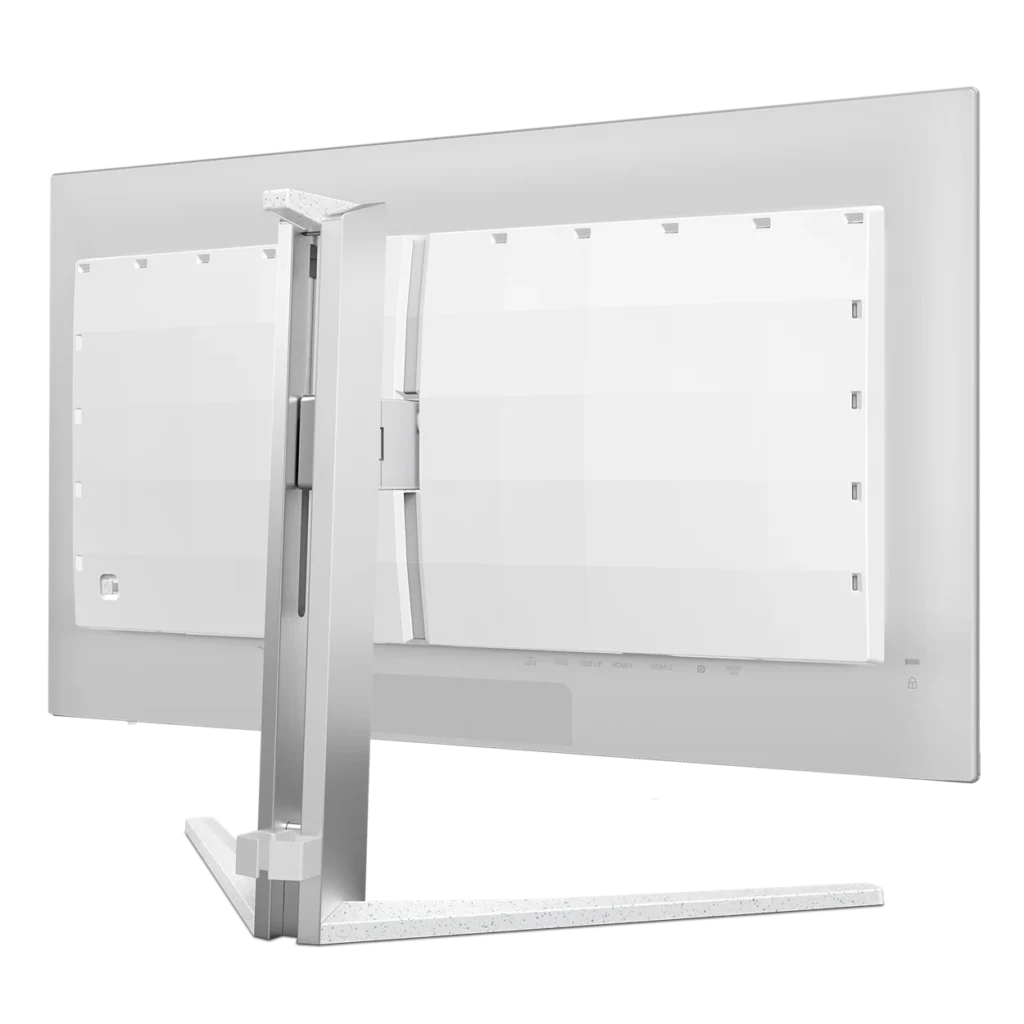
A tiny niggle is the location of the joystick to control the panel, as it’s located round the back on the right, and it’s not as easily accessible as it could be. Given I barely had to make any adjustments, though, it’s pretty much a non-issue.
Connectivity
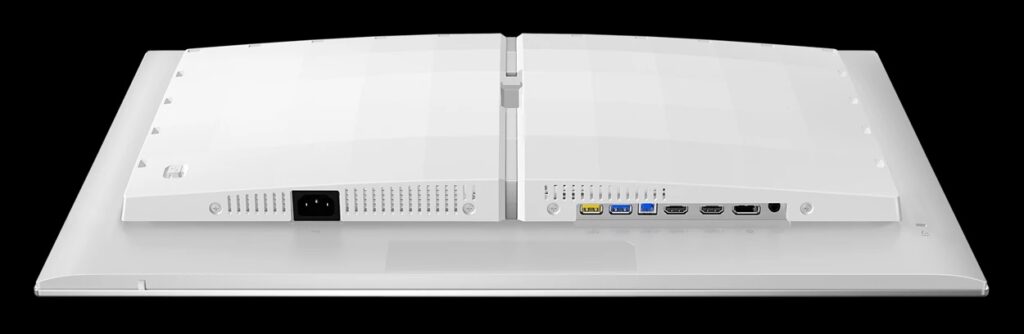
The port selection on the Evnia 27M2N8500 is modern and comprehensive. It includes two HDMI 2.1 ports and one DisplayPort 1.4, all of which can drive the panel at its native 1440p resolution and 360Hz refresh rate (note: DP1.4 uses DSC to achieve the full refresh rate). For console gamers, the HDMI ports support 120Hz, so this monitor is ideal for multi-system setups.
The monitor also serves as a USB hub, with a USB-B upstream port and two USB-A 3.2 downstream ports for connecting peripherals, including one fast-charge port. A 3.5mm headphone output is also included. A notable omission is the lack of a USB-C port or a KVM switch, a feature that allows for easy switching between multiple connected systems with a single keyboard and mouse. Considering the price point of the 27M2N8500, I’d have a hard time complaining about this, though.
The Evnia 27M2N8500 supports the following optimum resolutions:
- HDMI 2.1: 2560*1440 @ 360 Hz
- DisplayPort 1.4: 2560*1440 @ 360 Hz
- Console: 2560*1440 @ 120 Hz
Display Quality
Panel Response
As expected from a 360Hz OLED panel, the response times are functionally instant. With a Grey-to-Grey response time of just 0.03ms, motion is exceptionally clear, making it a dream for fast-paced, competitive games where tracking targets is paramount. The input lag is also remarkably low, with inputs feeling instantaneous. This level of responsiveness provides a tangible competitive advantage and a feeling of direct connection to the game.

Brightness, Contrast, and Colour
The use of a QD-OLED panel ensures the trademark infinite contrast and perfect black levels that the technology is known for. In terms of brightness, it’s on par with other QD-OLEDs, with a full-screen SDR brightness of 259 cd/m², though by running in HDR on Windows, you can bring the average up to around 350 cd/m². While this may sound like it could be dim in a very bright room, the vibrant colours and true blacks create a much higher perceived brightness thanks to the incredible contrast, which is essentially infinite, as the self-illuminating pixels completely darken. Out of the box, the monitor delivers a very colourful and punchy image.

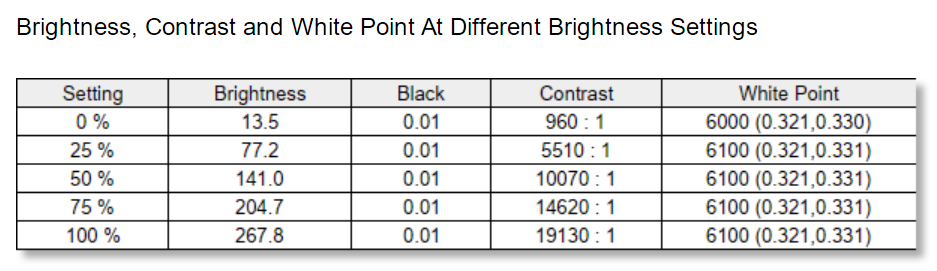
Colour temperature was slightly off on our review unit, measuring 6100K, which is warmer than the 6500K preset I was using – adjusting the in-built colour settings (to R:93/G:100/B:98) brought this up to 6472K, though it only made a noticeable but subtle difference; I hadn’t noticed until I checked with my colourimeter, even next to a calibrated display, so it’s not a real concern for plug-and-play users.
The out-of-the-box colour accuracy was remarkably good, with an average DeltaE of 0.19 and a maximum DeltaE of just 0.81, which is up there with the best results we’ve seen to date.
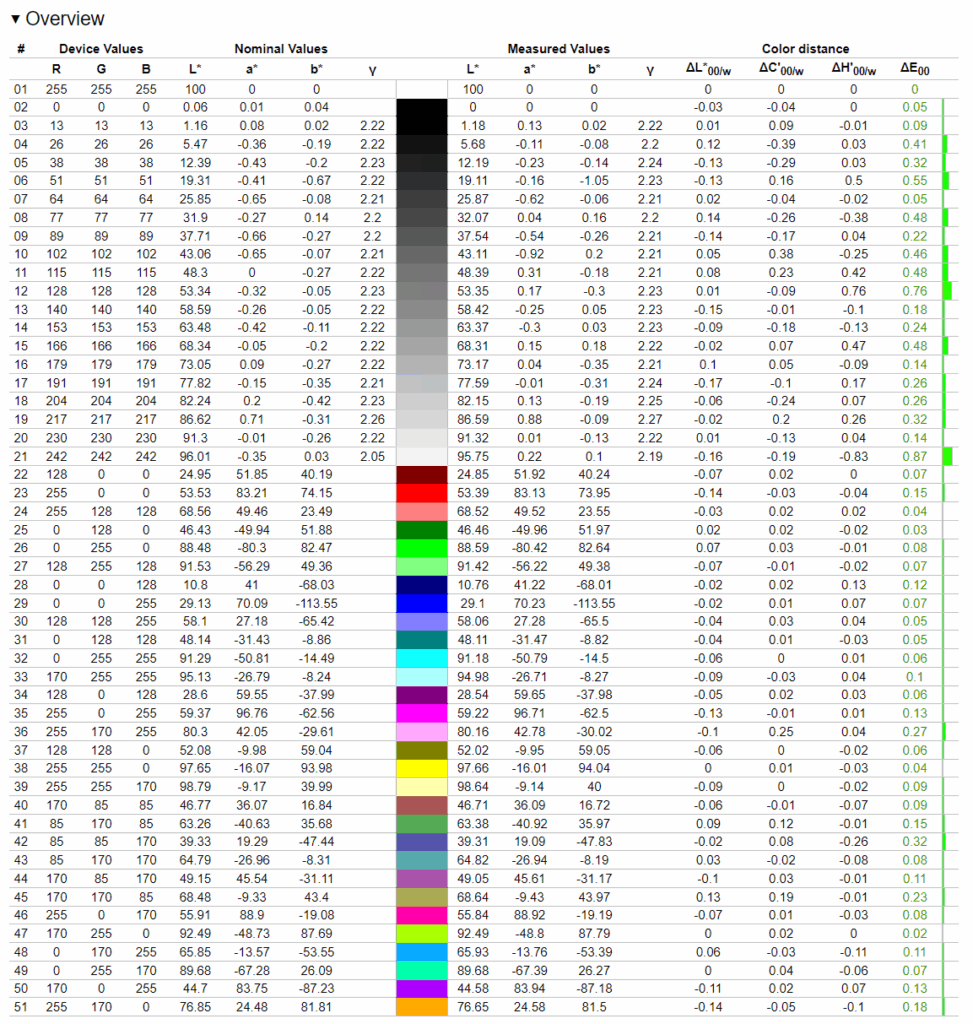
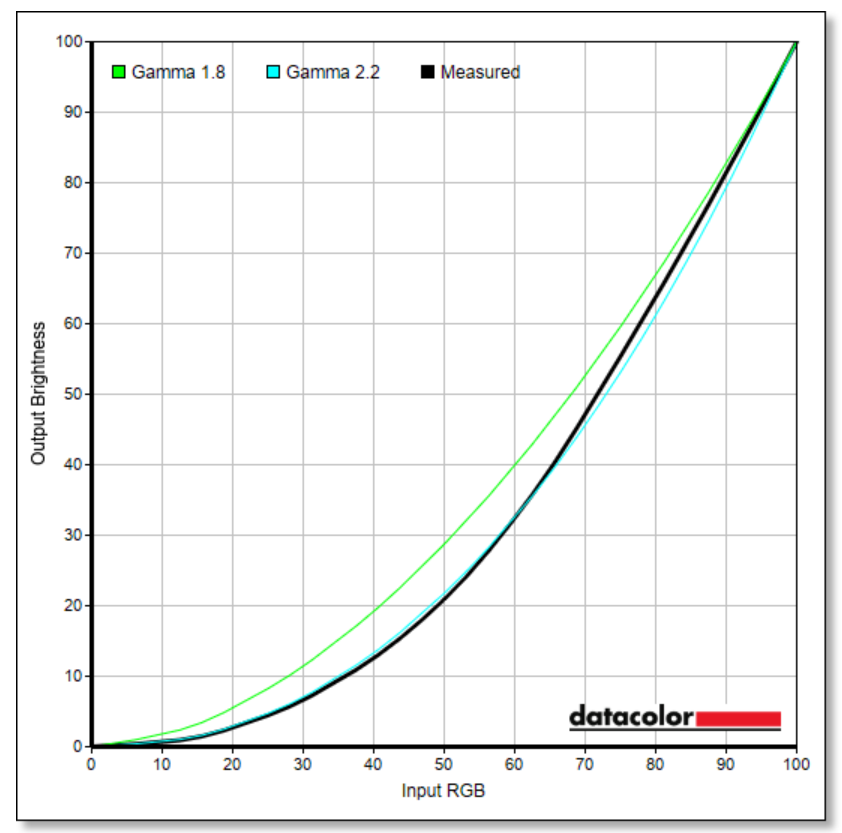
Gamma tracking was a little out, according to our tools. Using the 2.2 setting, our results reported the Gamma as 2.3, slightly brighter at the top of the curve and slightly lower at the bottom. When using a visual test chart, however, it seemed to be bang on the money – we have noticed this consistently with other OLEDs, so it may just be a nuance of our testing equipment not accurately reporting on OLED panels.
Gamut Coverage and HDR
The colour gamut is extensive, covering almost 100% of the DCI-P3 colour space and fully covering sRGB and AdobeRGB, which provides a rich and vibrant viewing experience. For content creators, the exceptional colour accuracy and wide gamut are a significant advantage.
I experimented with the sRGB colour clamping, which quite accurately locked the display to 100% sRGB coverage, but also allows you to change the brightnes, which is often unavailable in sRGB modes. I’m sure this will be very appreciated by those who don’t like over-saturation.
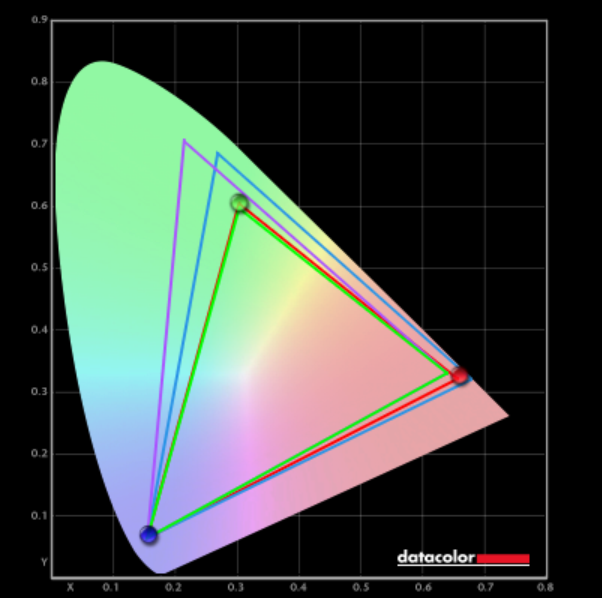
The panel in the 27M2N8500 has native 10-bit colour depth, allowing it to display up to 1.07 billion shades of colour.
- sRGB 100% coverage – 149.5% volume
- AdobeRGB 100% coverage – 117.5% volume
- DCI-P3 98.7% coverage – 100.3% volume
*Coverage refers to how much of the specified area of the gamut is covered, whilst volume includes any colour that extends beyond the defined gamut.
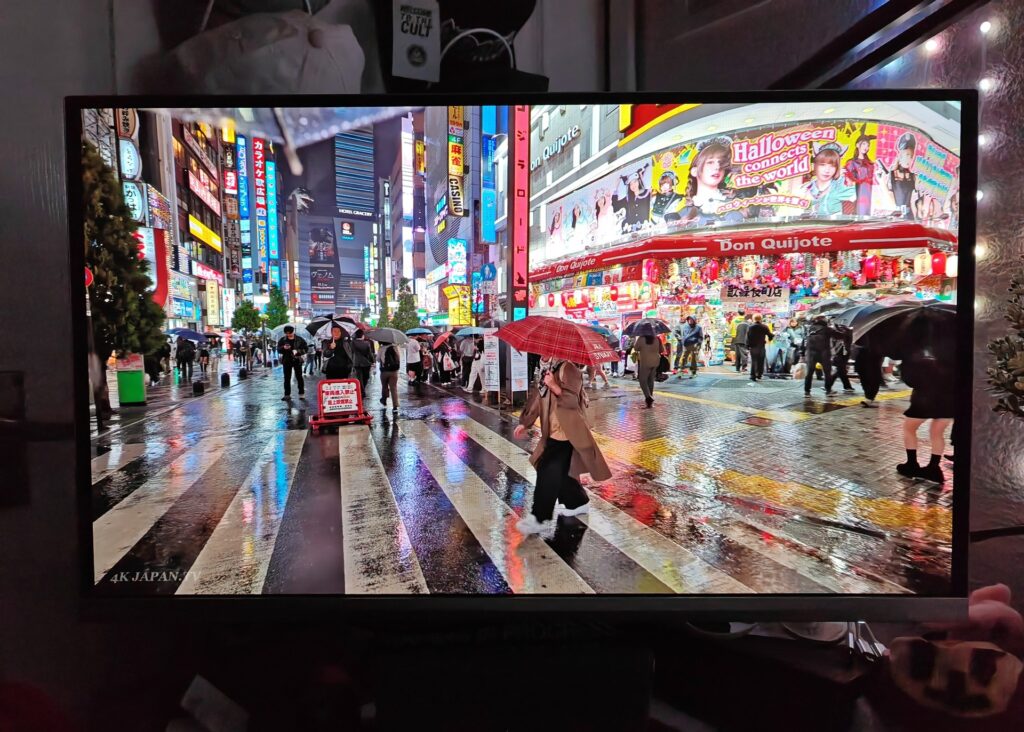
The DisplayHDR True Black 400 certification is well-earned, as the panel delivers the stunning HDR performance expected of OLED. The ability to have incredibly bright highlights right next to perfectly black pixels without any blooming or haloing creates a dynamic and immersive HDR experience in games and movies. The 27M2N8500 can exceed 450 cd/m² in a 10% window and over 1000 cd/m² at <3% APL. Several HDR modes are available to tailor the picture to the content being viewed, though I found the DisplayHDR mode to be the most balanced, giving superior contrast without the oversaturation present in some of the other modes.
Viewing Angles and Uniformity
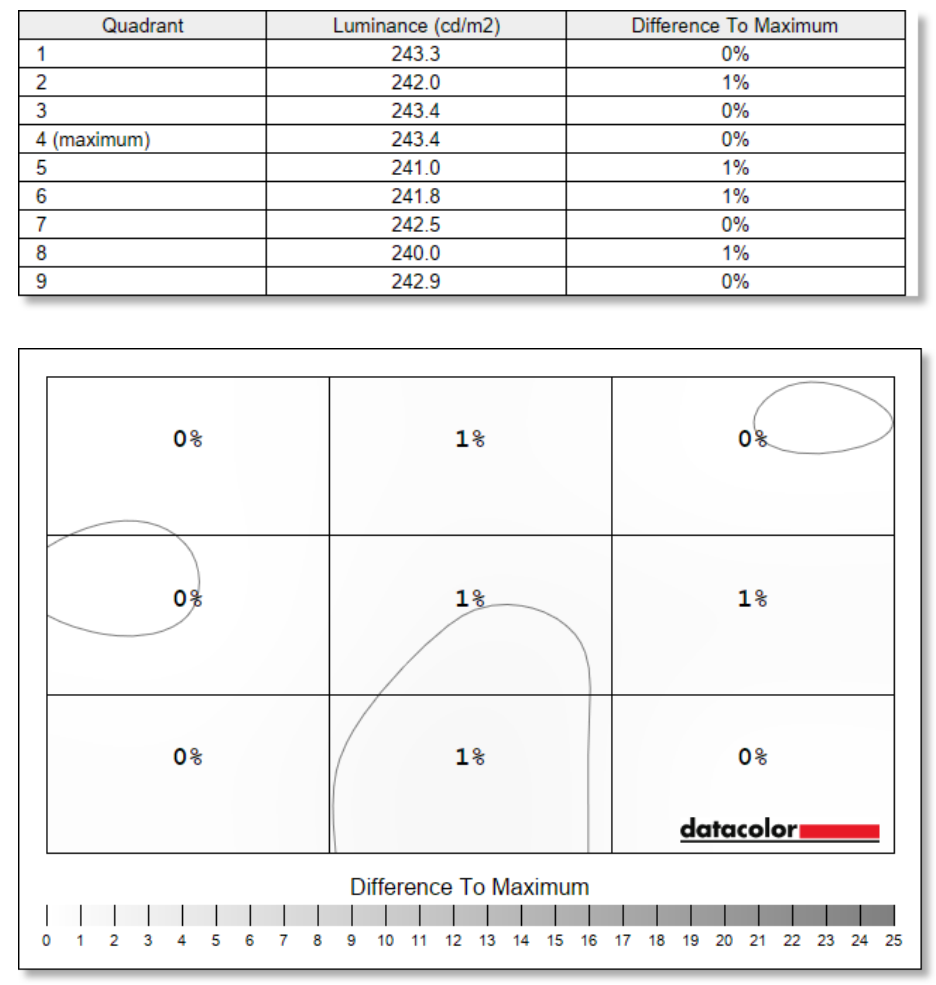
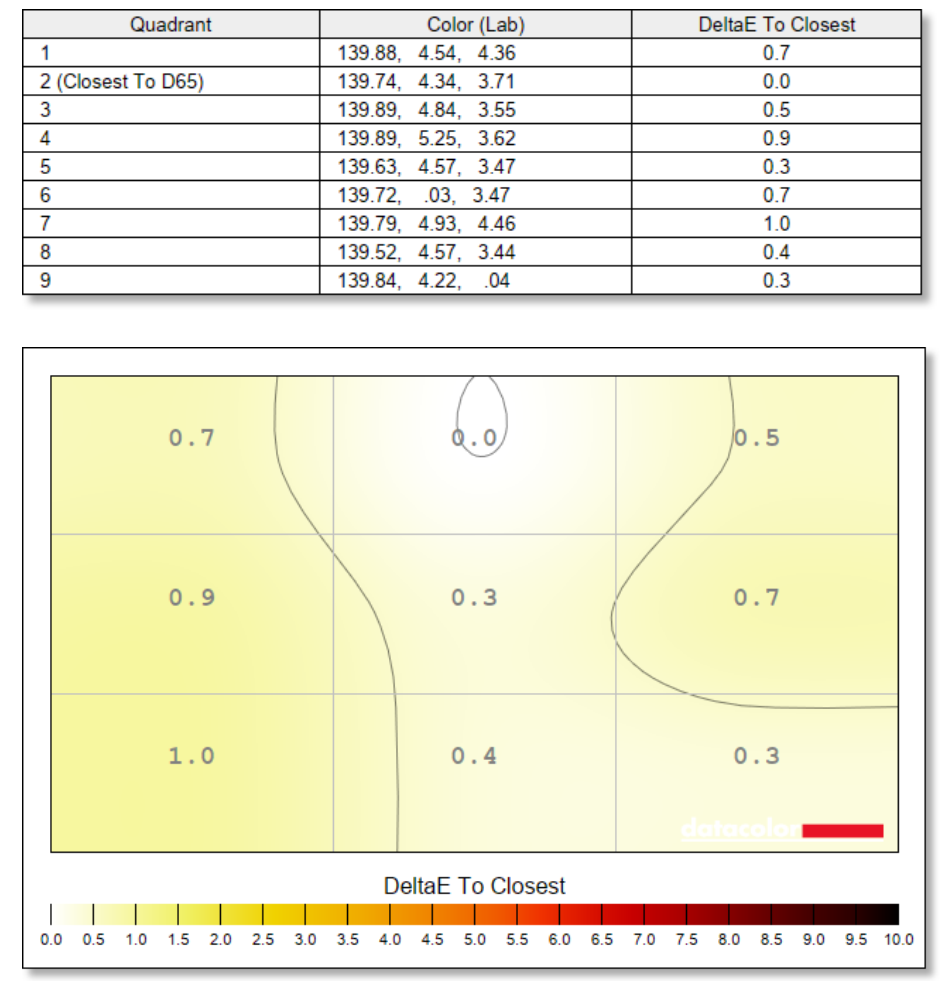
As is typical for OLED panels, the viewing angles are excellent. The image retains its colour and contrast even when viewed from extreme off-angles. Panel uniformity is also a very strong point, with consistent brightness (max deviation of around 1%) and colour (max deviation 1.0) across the entire screen, which is, of course, free from the backlight bleed that can plague LCD monitors and make blacks look washed out.
Panel Protection Features
Unlike early OLED panels, which only had rudimentary panel care features like screen dimming (that was occasionally very jarring), modern generation OLEDs have a plethora of screen-care features. The Evnia 27M2N8500 has seven care functions: Screen Saver (dims the image when it remains static for a period of time), Pixel Orbiting (shifts the image by a few pixels every few minutes – subtle and barely noticeable), Multi-Logo Protection (dims channel logos and ticker bars), Boundary Dimmer, Taskbar Dimmer (as you’d expect, dims the taskbar on the desktop), and Thermal Protection (prevents over heating and dims the display if necessary – handy in warmer climates). All of these features have different levels of strength, so you can tune them to your desired level. It’s a comprehensive suite of protection features that should help mitigate the potential for burn-in.
Finally, Pixel Refresh switches off the display and performs deeper level maintenance on the pixels. You get a warning after 4 hours, 6 hours, and 8 hours, after which it forces you to do the refresh. In my experience, however, I never had it force a refresh. When the display is off for a few hours, it automatically refreshes in the background, allowing you to play uninterrupted. As always, it’s best practice if you get into the habit of manually starting a refresh if you’re going to be away from your device for a while. (Although it says it could take 10 minutes to refresh, the 27M2N8500 refreshes in under 5 minutes, which makes the process trivial in terms of disruption to your entertainment.)
Sound Quality
The integrated dual 5-watt speakers are surprisingly capable. They produce a sound that is clear and can reach a decent volume without significant distortion. While they won’t compete with a dedicated set of speakers or a quality gaming headset, they are a welcome inclusion and are better than the speakers found on most monitors, making them perfectly serviceable for casual use.
Summary
The Philips Evnia 27M2N8500 is an exceptional gaming monitor that strikes a fantastic balance between performance, features, and price. I still can’t believe you can get this much performance, and OLED, no less, for just £439! Its 360Hz refresh rate and near-instantaneous response time deliver a level of motion clarity and responsiveness that is at the pinnacle of what is currently available, providing a clear advantage for competitive gaming.
The QD-OLED panel produces a beautiful, vibrant, and contrast-rich image that makes games and movies look spectacular, with HDR performance that is truly a sight to behold. While the absence of a KVM switch is a minor drawback, and the SDR brightness is typical for an OLED, these points do little to detract from the overall package.
Finally, the stylish white design and immersive Ambiglow lighting make the Evnia 27M2N8500 unique amongst a sea of black monitors. For any gamer looking to upgrade to a high-performance 1440p OLED display, the Philips Evnia 27M2N8500 is one of the best value propositions on the market and easily earns our recommendation.
